sudo pip install --upgrade virtualenv
virtualenv --system-site-packages ~/tensorflow
source ~/tensorflow/bin/activate
TF_BINARY_URL=https://storage.googleapis.com/tensorflow/mac/cpu/tensorflow-0.12.1-py2-none-any.whl
pip install --upgrade $TF_BINARY_URL
pip install --upgrade virtualenv
virtualenv --system-site-packages -p python.exe tensorflow
tensorflow\Scripts\activate
pip install --upgrade https://storage.googleapis.com/tensorflow/windows/cpu/tensorflow-0.12.1-cp35-cp35m-win_amd64.whl
- warning: most samples are not updated.
sudo pip install --upgrade virtualenv
virtualenv --system-site-packages ~/tensorflow
source ~/tensorflow/bin/activate
pip install --upgrade tensorflow
deactivate
import tensorflow as tf
import numpy as np
x_data = np.random.rand(100).astype(np.float32)
y_data = x_data * 0.1 + 0.3
W = tf.Variable(tf.random_uniform([1], -1.0, 1.0))
b = tf.Variable(tf.zeros([1]))
y = W * x_data + b
loss = tf.reduce_mean(tf.square(y - y_data))
optimizer = tf.train.GradientDescentOptimizer(0.5)
train = optimizer.minimize(loss)
init = tf.global_variables_initializer()
sess = tf.Session()
sess.run(init)
for step in range(201):
sess.run(train)
if step % 20 == 0:
print(step, sess.run(W), sess.run(b))

- 경사하강법
tf.train.GradientDescentOptimizer()-

-

-

-

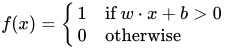
- 0 or 1
- True of False
- the perceptron is an algorithm for learning a binary classifier
- http://pythonkim.tistory.com/19
- “softmax는 데이터를 2개 이상의 그룹으로 나누기 위해 binary classification을 확장한 모델이다.”
- “통계에서 가장 큰 값을 찾는 개념을 hardmax라고 부른다. softmax는 새로운 조건으로 가장 큰 값을 찾는 개념을 말한다. 일반적으로는 큰 숫자를 찾는 것이 hardmax에 해당하고, 숫자를 거꾸로 뒤집었을 경우에 대해 가장 큰 숫자를 찾는다면 softmax에 해당한다. 여기서는 우리가 알고 있는 큰 숫자를 찾는 것이 아니라는 뜻으로 쓰인다.”
- The cross-entropy measure has been used as an alternative to squared error.
- Cross-entropy can be used as an error measure when a network’s outputs can be thought of as representing independent hypotheses
- noise-contrastive estimation loss
- 텐서플로우(TensorFlow)를 이용해 자연어를 처리하기(NLP) – Word Embedding(Word2vec)
- Convolutional Neural Network
- 이미지를 작게 쪼개어서 분석하는 기법
- Convolutional Layer + Pooling Layer
- 참고: http://sanghyukchun.github.io/75/
- sparse weight, tied weight, equivariant representation
- 합성곱
- CNN Architecture
- Convolutional Layers
- Sub-sample Layers
-

- 더 dimension이 낮은 feature map을 얻기 위하여 Subsampling
- convolution layer의 feature map을 조금 더 줄여주는 역할
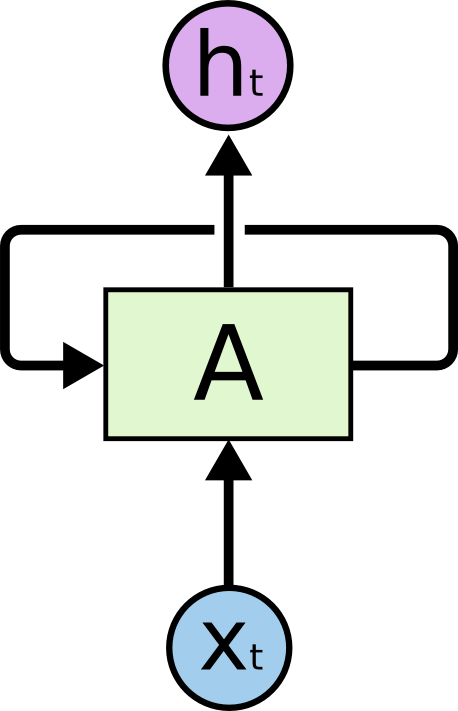
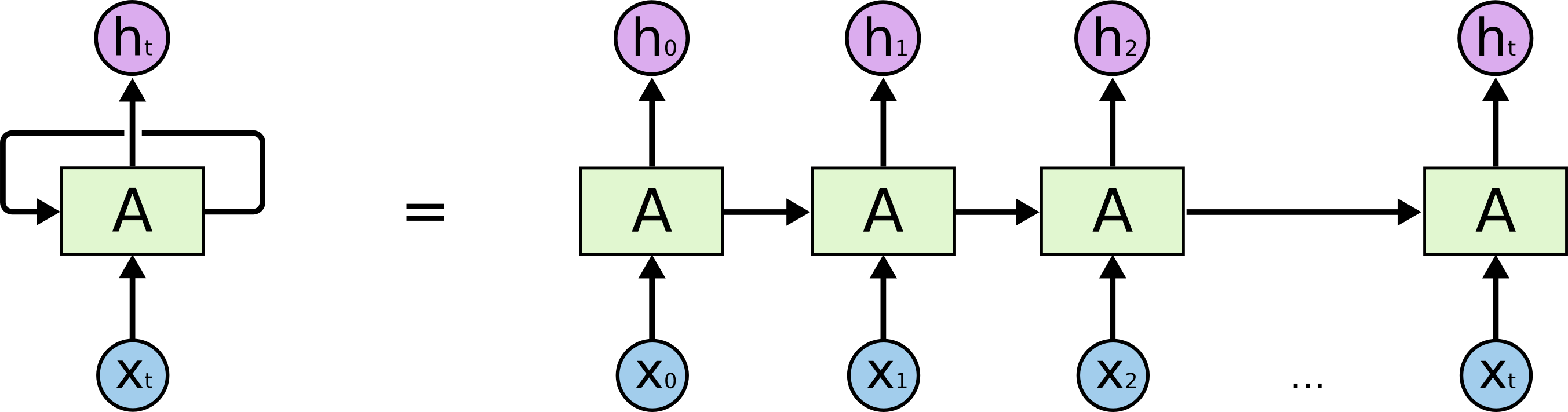
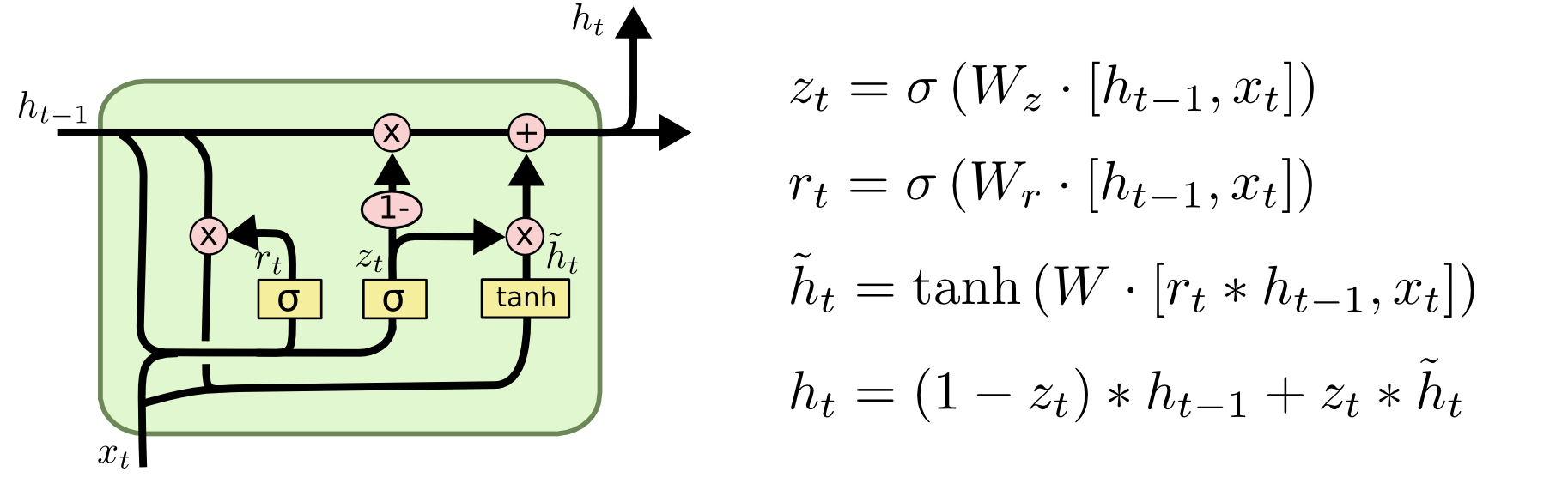
- Long Short Term Memory
- Long Short Term Memory networks – usually just called “LSTMs” – are a special kind of RNN, capable of learning long-term dependencies.
- Hochreiter & Schmidhuber (1997)
-
- Conditional Random Field
- 이웃하는 표본을 고려하여 예측
- 활용: 자연언어 처리, HCI, 컴퓨터 비전, 생물정보학
- rank : dimension of tensor
- shape : rows and columns of tensor
- type : data type of tensor
- mlp : MultiLayer Perceptron
import numpy as np
tensor_1d = np.array([1.3, 1, 4.0, 23.99])
print tensor_1d
print tensor_1d[0]
tensor_1d.ndim
tensor_1d.shape
tensor_1d.type
import tensorflow as tf
tf_tensor = tf.convert_to_tensor(tensor_1d, dtype=tf.float64)
tensor_2d = np.array([(1,2,3,4), (5,6,7,8), (9,10,11,12), (13,14,15,16)])
print tensor_2d
tensor_2d[0:2,0:2]
- random_uniform() : Uniform Distribution Funtion
- random_uniform(shape, minval, maxval, dtype, seed, name)
- Uniform Distribution : 주어진 범위 내의 모든 수가 동일한 분포를 갖는 형태
- random_normal() : Normal Distribution Function
- random_normal(shape, mean, stddev, name)
- Max: what’s the maximum of a function?
- Argmax: what’s the input that gives us that maximum?
- Epoch : learning cycle
- Perceptron : neural network model, feedforward network
- single-layer perceptron
- multilayer perceptrons
 - image from : http://www.saedsayad.com/artificial_neural_network_bkp.htm
*
- image from : http://www.saedsayad.com/artificial_neural_network_bkp.htm
*
 - image from : http://blog.refu.co/?p=931
- one-hot : 벡터에서 하나만 1이고 나머지는 0으로 채워진 경우 [0,0,0,1,0,0,0,0,0,0] == 3
- image from : http://blog.refu.co/?p=931
- one-hot : 벡터에서 하나만 1이고 나머지는 0으로 채워진 경우 [0,0,0,1,0,0,0,0,0,0] == 3
- 텐서플로 첫걸음
- 텐서플로 입문
- 어서와! 머신러닝은 처음이지? ®
name="a"merged = tf.merge_all_summaries()writer = tf.train.SummaryWriter("/tmp/tensorflowlog", session.graph)
tensorboard --logdir=/temp/tensorflowlogs
import tensorflow as tf
a = tf.constant([1.0, 2.0, 3.0, 4.0, 5.0, 6.0], shape=[2, 3], name='a')
b = tf.constant([1.0, 2.0, 3.0, 4.0, 5.0, 6.0], shape=[3, 2], name='b')
c = tf.matmul(a, b)
sess = tf.Session(config=tf.ConfigProto(log_device_placement=True))
print(sess.run(c))
Device mapping:
/job:localhost/replica:0/task:0/gpu:0 -> device: 0, name: Tesla K40c, pci bus
id: 0000:05:00.0
b: /job:localhost/replica:0/task:0/gpu:0
a: /job:localhost/replica:0/task:0/gpu:0
MatMul: /job:localhost/replica:0/task:0/gpu:0
[[ 22. 28.]
[ 49. 64.]]
sudo dnf install pciutils
lspci | grep -i vga
import tensorflow as tf
with tf.device('/gpu:0'):
a = tf.constant([1.0, 2.0, 3.0, 4.0, 5.0, 6.0], shape=[2, 3], name='a')
b = tf.constant([1.0, 2.0, 3.0, 4.0, 5.0, 6.0], shape=[3, 2], name='b')
c = tf.matmul(a, b)
sess = tf.Session(config=tf.ConfigProto(log_device_placement=True))
print(sess.run(c))